How Production Planning Tools Improve on Spreadsheet-Based Planning in the USA
by Kunal Kapur
 9
Mins Read
9
Mins Read
Key Takeaways
- Production planning software vs spreadsheets: software recalculates the plan against finite capacity, the critical path and materials; a spreadsheet must be rebuilt by hand.
- ERP and PLM systems store planning data but do not load lines against finite capacity, which is why planners in ERP-equipped factories still keep spreadsheets.
- US apparel imports moved through three duty regimes in 2026: IEEPA tariffs, a Section 122 surcharge, then Section 301 forced-labour tariffs from 24 July.
- Moving an order to Central America usually means moving the fabric too, because CAFTA-DR duty-free treatment generally requires regional yarn and fabric.
- Measure on-time start of production, not just on-time delivery; many late shipments are decided in pre-production, weeks before sewing begins.
- Coats Digital reports FastReactPlan users typically gain 3 to 10% productivity and 10 to 30% better OTDP, with payback inside 12 months.
- Switch in stages: start with the critical path or one factory, run it alongside the spreadsheet, and set measurable targets before go-live.
Every Monday, in garment factories that ship to US brands, planners rebuild the master plan in Excel. By midweek, it is already wrong. A mill has pushed a fabric delivery back two weeks, a buyer has added 30% to an order, and a new duty rate has made one style cheaper to sew in Guatemala than in Vietnam.
Each change has to be traced by hand through linked sheets for line loading, the time and action calendar and fabric. Then the file goes out by email again, and the planner hopes nothing broke on the way.
That is what the choice between production planning software and spreadsheets really comes down to. A spreadsheet stores the last version of the plan someone typed. Planning software holds a working model of capacity, the pre-production critical path and materials, so when one input changes, it recalculates everything that depends on it.
Re-planning stops being a rebuild and becomes an adjustment.
The gap has become expensive. In the BoF-McKinsey State of Fashion 2026 executive survey, 76% of fashion leaders said their response to tariffs and trade disruption would be the single biggest factor shaping the year. Inside a factory, each of those responses lands as a re-plan.
This guide is written for production, planning and sourcing leaders running apparel or footwear manufacturing for the US market. It covers what production planning involves, where spreadsheets break, what dedicated tools do differently, why the 2026 US trade picture raises the stakes, and how to switch without disrupting the floor.
What Does Production Planning Cover In Apparel And Footwear?
Production planning in apparel and footwear is five linked jobs: confirming orders against finite capacity, running the pre-production critical path, scheduling lines in standard minutes, calling materials from the live plan and, in footwear, respecting tooling limits. Each depends on the others. Move a fabric date, and the cut date, the line load and possibly the ship date move with it, which is why garment production planning is harder than it looks from outside the factory.
Order confirmation and finite capacity
Finite capacity planning loads work only up to what a line can actually produce in a period, usually measured in available standard minutes at the line’s real efficiency. Infinite capacity planning, the default in any spreadsheet, accepts whatever is typed against a line and lets the overload surface later as overtime, subcontracting or a missed date.
The pressure point is order confirmation. Buyers want dates quickly, and a factory that cannot check capacity, materials and approvals in time ends up promising from experience.
At Bodynits‘ first factory in Vietnam, a 30-line operation making around 80 styles a month, the factory manager used to spend five to seven days pulling that information together for each plan. “It took so long just to get the data in one place!” she recalled, while customers pushed for faster answers.
The critical path and the time and action calendar
The critical path, usually run as a time and action (T&A) calendar, is the chain of pre-production milestones that must be met for production to start on time: lab dips, fit and pre-production samples, buyer approvals, and fabric and trims arriving in the factory. Every buyer order has its own.
Many late shipments are decided here, weeks before a garment reaches a sewing line. A pre-production sample approved a week late becomes a late cut, then a late line loading, then a late ship date. That makes on-time start of production a more useful early warning than on-time delivery itself.
Our guide to managing on-time delivery for several buyers at once goes deeper into running many T&A calendars against one set of lines.
Line scheduling in standard minutes
Line scheduling sequences styles across sewing lines using each garment’s Standard Minute Value (SMV, also called SAM), the line’s efficiency profile and a learning curve for new styles. Reliable SMVs, typically built with a predetermined time system such as GSDCost, are what make a schedule believable.
Good planners also protect product families. Every style change costs output while operators relearn, so keeping similar garments on the same line for longer runs is one of the cheapest efficiency gains available. Nice Group, which reported a 4% rise in factory efficiency, describes its planners focusing on exactly that.
The trade-off is real. Sometimes the efficient move is to start an order before its natural slot so a product family keeps running, which only works if the planner can see that its materials are already in the factory. Spreadsheets rarely show that at the moment the decision is made.
Bottleneck processes such as embroidery, printing and laundry then need scheduling from the sewing plan, not in a separate sheet that drifts out of step.
Materials on a pull basis
Pull-based materials planning calculates fabric and trim requirements from the latest sewing plan rather than an earlier forecast; it is the lean equivalent of just-in-time. Mills and trim suppliers then work to priorities that match what the factory will actually sew next, and the factory needs less fabric and work in progress parked as a buffer.
Footwear’s extra constraint: tooling
Footwear plans must also respect lasts, moulds and forms. This tooling is finite and specific to style and size, and a mould can only be in one press at a time. Two styles sharing a last cannot both run at full volume in the same week, however much stitching or lasting capacity is free.
Why Production Planning Is Not an ERP or PLM Problem
An ERP records transactions and a PLM holds product data. Neither produces a finite-capacity, critical-path production schedule, which is the job dedicated planning software exists to do. Confusing the three is the main reason spreadsheets survive in factories that already run an ERP.
The confusion is understandable. “Planning” appears in plenty of ERP brochures, and many PLMs track development milestones. But both are systems of record, not planning engines, which is why planners in ERP-equipped factories still keep a spreadsheet: the ERP cannot tell them whether line 7 can take another 8,000 pieces in week 34.
| System | What it is for | Does it produce a finite-capacity, critical-path production plan? |
| ERP | Orders, inventory, purchasing and finance | No. It holds the data a plan needs but does not load lines against capacity. |
| PLM | Product data and development: tech packs, bills of materials, samples, approvals | No. It defines what the product is, not when and where it is made. |
| Production planning software | Planning and control of capacity, the critical path and materials | Yes. It models capacity, links milestones and calculates materials from the live plan. |
Some PLMs, including Coats Digital’s VisionPLM, manage development critical paths for sampling and approvals. What a PLM does not do is schedule production against line capacity and re-cascade the plan when a milestone slips.
In practice, the three systems work together. The planning tool takes open orders, inventory and open material purchase orders from the ERP and product data from the PLM, plans production, then sends line plans and material priorities out to factories and suppliers. Actual output flows back from shop-floor data collection so the plan can be checked against reality.
FastReactPlan handles this exchange through an automatic, timed or triggered shared-file interface, which lets each receiving system run its own integrity checks before accepting data. The planning layer replaces the spreadsheet bridge, not the ERP. For a vendor-by-vendor view of where ERPs, PLMs and specialist tools sit, see our 2026 comparison of production planning software for US clothing brands.
Why Do Manufacturers Still Plan Production In Spreadsheets?
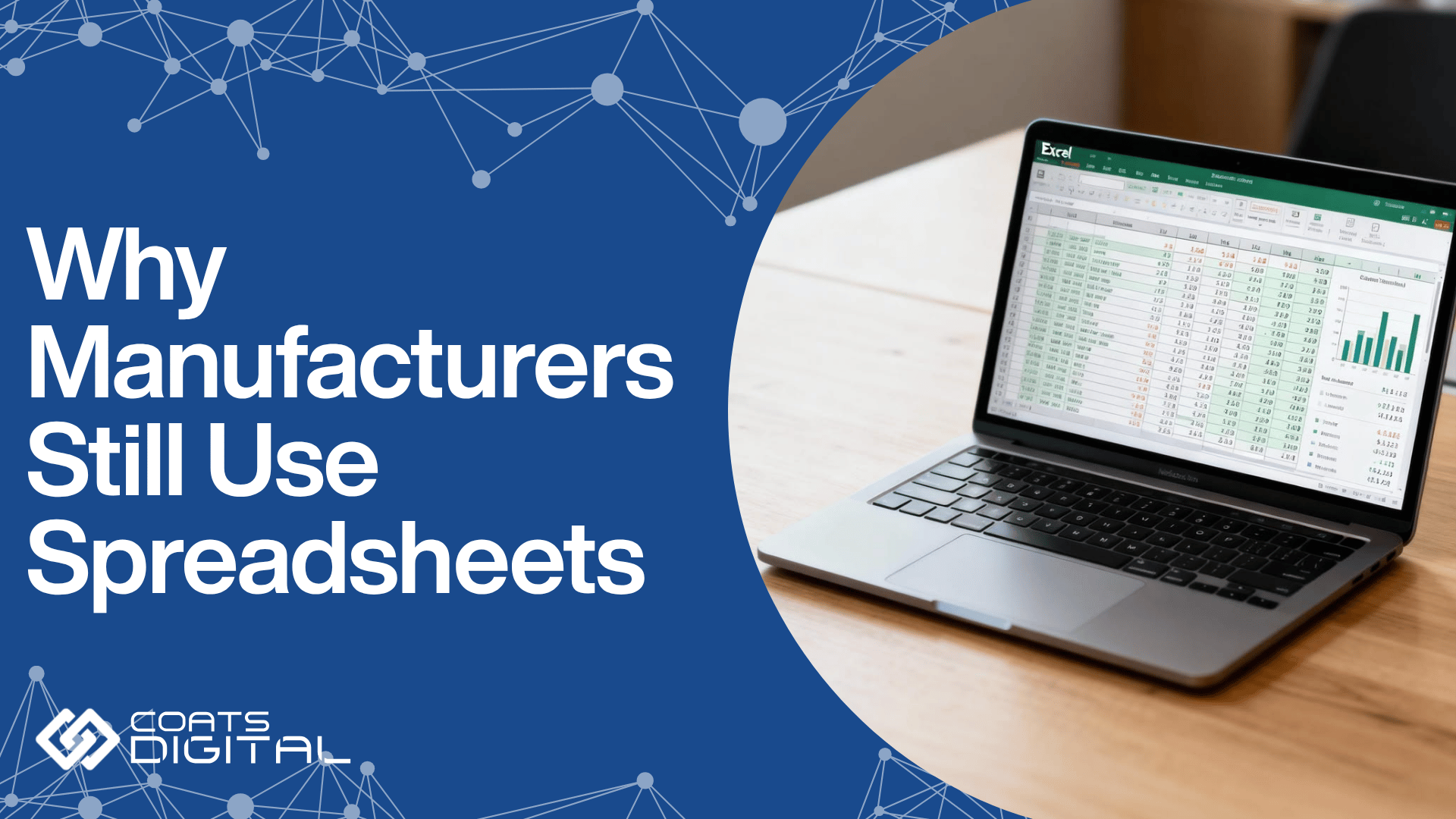
Spreadsheets won production planning for good reasons: they are flexible, familiar, already paid for and readable by every buyer, mill and subcontractor. They stop working when styles, factories and the frequency of change grow beyond what a static file can track.
That deserves saying plainly, because the reader is often the person who built the spreadsheet. For a single site with a stable, repeat order book, Excel does the job.
It is still widespread: in Capterra research published in April 2026, 23% of the small and midsize manufacturing software buyers it spoke to in 2025 planned in spreadsheets, and another 25% relied on manual methods. That sample covers manufacturing in general, not apparel alone.
What changed underneath the spreadsheet
The order book stopped standing still. Style counts and colourways rose, lead times shortened, batches shrank, and production spread across more sites. For makers serving the US, orders now move between countries as duty rates change.
Capterra found 37% of buyers switched because planning inefficiency had started slowing execution, and 34% because spreadsheets could no longer do what they needed.
Apparel case studies describe the same tipping point. Before Song Hong in Vietnam moved planning onto a dedicated system, coordinating merchandising, planning and production took multiple spreadsheets and a stream of emails just to establish where production stood. South Asia Textiles in Sri Lanka described “a serious lack of visibility of capacity plans beyond a three-day window.”
The hidden costs of spreadsheet planning
Spreadsheet planning looks free because its costs land somewhere else:
- Overtime to catch up on lines that were overloaded on paper.
- Air freight to rescue orders that slipped in pre-production.
- Buyer penalties for late or short shipments.
- Fabric and work in progress held as a buffer against uncertainty.
- Lines standing idle because nobody saw the gap in time.
South Asia Textiles cut average machine idle time by 74% within six months of moving to a planning system. That is a measure of how much capacity can hide inside a plan nobody can see clearly.
Where Does Spreadsheet-Based Planning Break? Seven Failure Points
Spreadsheet planning fails on seven fronts: no finite capacity, no live critical path, version conflict, slow re-planning, silent errors, no scenario comparison, and knowledge locked in one person. None of these is the planner’s fault. Each follows from using a tool that stores a picture of the plan rather than a model of it.
- No finite capacity: A spreadsheet will schedule more work than a line can make. The overload shows up on the floor as overtime, subcontracting or a missed ship date.
- No live critical path: Milestones sit in separate cells with nothing linking them. When fabric slips, the downstream dates stay put, so the knock-on delay is discovered late, usually when recovering it means air freight.
- Version conflict: The plan is a file that gets emailed, renamed and edited in parallel. Merchandising, production and the mill end up working from different versions, and reconciling them becomes a job of its own.
- Re-planning takes too long: Every change means rebuilding dates, line loads and material calls by hand. When conditions change daily, a plan that takes a day to rebuild is permanently behind.
- Errors spread silently: A broken link or dragged formula corrupts the plan without warning. Across seven field audits since 1995, Raymond Panko of the University of Hawaii found errors in 88% of the 113 spreadsheets examined. The costliest example sits outside apparel: JPMorgan’s own management task force found the risk model behind its 2012 “London Whale” losses, which exceeded $6 billion, ran on Excel sheets completed by manual copying and pasting.
- No way to compare scenarios: A spreadsheet holds one state at a time, so trade-offs between factories, dates and costs get argued rather than tested.
- Knowledge locked in one head: The logic often lives only with the planner who built the file. When that person is on leave, or leaves, planning slows or stops.
Production Planning Software Vs Spreadsheets: A Side-By-Side Comparison
The table below compares the two approaches on the dimensions that decide delivery performance in apparel and footwear manufacturing.
| Dimension | Spreadsheet-based planning | Production planning software |
| Capacity model | Infinite: can schedule beyond real capacity | Finite: models real factory and line capacity |
| Critical path | Static cells; no automatic re-cascade | Linked milestones; slipped dates re-cascade with alerts |
| Re-planning speed | Manual rebuild; slow when change is frequent | Fast adjustment: the model recalculates |
| Error risk | High: silent formula and reference errors | Lower: rules-based logic and validated data |
| Scenarios | One state at a time | Several scenarios compared before committing |
| Visibility | Emailed file; competing versions | One shared, live plan |
| Materials | Tracked separately from the plan | Calculated on demand pull from the live plan, using ERP data |
| Footwear tooling | Poorly tracked; easily double-booked | Constraint planning for lasts, moulds and forms |
| Scale | Degrades as lines, factories and styles grow | Built for multi-factory, multi-line master planning |
| Auditability | Hard to reconstruct who changed what | Traceable plan history |
How Do Production Planning Tools Work Differently?
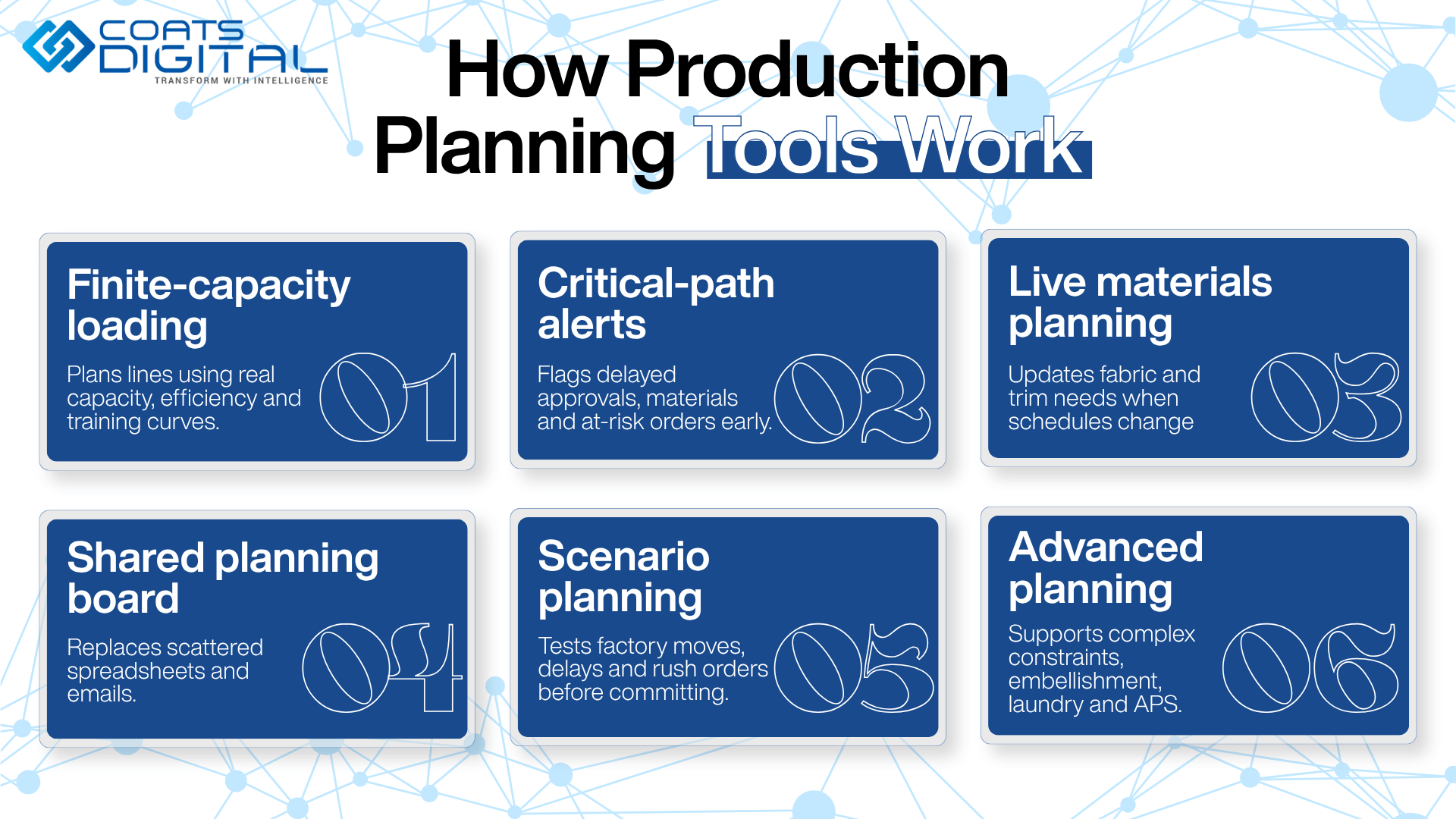
Production planning software loads lines in standard minutes against real capacity, links the critical path so a slipped date re-cascades automatically, calculates materials from the live plan, and lets planners test scenarios before committing. The plan becomes a living model rather than a static document. The examples below use FastReactPlan, Coats Digital’s production planning and control software, to show how the category works in practice.
Finite-capacity line loading
Finite-capacity line loading schedules each line against what it can realistically produce. In FastReactPlan, sewing is planned on a drag-and-drop board that applies standard minutes, efficiency profiles and start-up or training curves, and schedules for embroidery, printing and other bottleneck processes follow automatically from the sewing plan. An overload shows up on the board weeks before it would show up on the floor.
A linked critical path and exception-based planning
A linked critical path ties pre-production milestones together, so a late approval or fabric delivery moves every date that depends on it and flags the orders now at risk. Target dates update from the latest plan, and colour-coded alerts mark late events while there is still time to act.
That changes how planners spend their day. Instead of checking every order, they work the short list the system has flagged. Failure reason codes then show which milestones fail most often, and Song Hong’s master planner says the late-event analysis also gives the team evidence when a delay traces back to a buyer’s own approvals.
Materials pulled from the live plan
Pull-based materials planning recalculates fabric and trim requirements whenever the sewing plan changes. FastReactPlan imports inventory and open material purchase orders from the main business system, so supply is compared with demand on current data. Suppliers see real priorities early, and the factory carries less buffer stock.
One board instead of an emailed file
A shared planning board replaces the spreadsheet in everyone’s inbox. For groups with several factories, a master-planning “control tower” view balances total demand, confirmed and projected, against capacity across all sites and subcontractors.
Scenarios tested before they are committed
Scenario planning lets a planner model a change in a sandbox and compare the outcome before touching the live plan. Typical tests include ramping capacity up or down, moving work between factories or to a subcontractor, absorbing a fabric delay, or slotting in a rush order.
Constraint planning and APS for complex operations
Optional modules extend the model where an operation needs it:
- Constraint planning tracks lasts, moulds and forms for footwear.
- Embellishment and laundry planning reschedules connected processes around their minimum runs and lead times.
- Advanced planning and scheduling (APS) plans large order volumes against multiple constraints at once.
What Coats Digital customers report
The results below are published by Coats Digital from customer implementations. They are vendor-reported rather than independently audited, so treat them as indicative and measure your own baseline.
- Typical results across users: a 3 to 10% gain in productivity, a 10 to 30% improvement in on-time delivery performance (OTDP), a 10 to 30% reduction in lead time, and a typical return on investment within 12 months. FastReactPlan plans more than 2,000 factories for over 500 clients in more than 40 countries (FastReactPlan product information, checked 6 October 2026).
- Bodynits cut its planning cycle from five to seven days to one day and raised average efficiency by 20%.
- South Asia Textiles reduced plan preparation from eight hours to two and improved OTDP by 15%.
- Song Hong reported a 20% reduction in planning time and a 7% improvement in plan versus actual.
Why Is Re-Planning Speed a US Competitive Issue In 2026?
Apparel and footwear makers serving the US face shifting duty rates, sourcing spread across more countries and rising compliance demands. All three reward fast, reliable re-planning. In 2026, the advantage sits with factories and brands that can re-plan quickly every time the rules change, not with whoever had the best plan in January.
US trade position, verified 6 October 2026
- Until 20 February 2026: most of the 2025 “reciprocal” tariffs rested on the International Emergency Economic Powers Act (IEEPA). The Supreme Court ruled that day that IEEPA does not authorise tariffs (Congressional Research Service).
- 24 February to 24 July 2026: a temporary 10% global surcharge applied under Section 122 of the Trade Act of 1974, which caps such duties at 150 days.
- From 24 July 2026: USTR Section 301 duties on 60 economies, tied to forced-labour import enforcement. The rate is 10% for economies including Bangladesh, Cambodia, India, Indonesia, Pakistan, Sri Lanka, Mexico, Guatemala, Honduras and El Salvador, and 12.5% for the others, including China, Vietnam and Thailand. For these apparel sourcing countries, the duty sits on top of the normal (MFN) rate.
- Exemptions: USMCA-compliant goods, and textiles and apparel entering duty-free under CAFTA-DR. Tariff-rate quotas for some textiles and apparel from Bangladesh, Cambodia, Indonesia and Malaysia were announced, with volumes still to be set (Kelley Drye summary of the final action).
- Still open: a separate Section 301 investigation into excess manufacturing capacity in 16 economies could add further duties.
Trade measures change quickly. Confirm current rates with a licensed customs broker before acting on them.
How 2026 duty changes turned sourcing into a moving target
US apparel imports went through three duty regimes in seven months. Each changed landed cost by country, and each sourcing response created a re-plan: a new factory, a fresh capacity check, a new critical path and a new materials timeline.
The pattern began in 2025. Kearney’s 2026 Reshoring Index found that 75% of the manufacturing executives it surveyed had switched country of origin away from China to other low-cost countries, while only 20% had looked at domestic production. US apparel and accessories output fell 17% in 2025.
One CEO in the survey said teams were ready to act but “we just need the goal posts to stop moving.”
For a planner, every moved goalpost is another rebuild. Nor is the pressure confined to fashion: in McKinsey’s 2025 supply chain risk survey, 82% of supply chain leaders said new tariffs affected their supply chains, with consumer goods companies the most exposed.
Why multi-country sourcing strains spreadsheet planning
US fashion companies are spreading volume rather than simply swapping one country for another. The 2026 USFIA Fashion Industry Benchmarking Study, led by Dr Sheng Lu at the University of Delaware, found respondents sourcing apparel from 49 countries, up from 46 a year earlier, with about 65% of large companies using ten or more. China’s share of US apparel imports fell below both Vietnam’s and Bangladesh’s.
The Western Hemisphere is gaining ground within that mix. 76% of respondents sourced from CAFTA-DR members in 2026, up from 64% in 2025, and sourcing from Guatemala, Egypt and Jordan expanded.
Nearshoring is not a straight line, though. In Kearney’s survey, 55% of executives said tariff policy had made nearshoring less attractive, and USFIA respondents are now consolidating suppliers rather than adding new countries.
On the factory side, the result is a more balanced but more volatile order book, with volume shifting between sites a group already runs. Planning one range across several countries is exactly where spreadsheets fall apart, and multi-factory master planning pays for itself. For the cost side of the same pressure, see how US clothing brands are protecting margins as supplier costs rise.
How forced-labour compliance raises the bar on the plan
Forced-labour risk climbed from tenth to sixth among business challenges in the USFIA study, and the July 2026 Section 301 action is itself built around forced-labour enforcement. Brands are asking suppliers for more traceability and documentation.
A planning record with history, showing which factory, which mill and which dates, is easier to stand behind than a spreadsheet overwritten last Tuesday. It is not a compliance system, but it removes a weak link.
One finding should worry anyone postponing the decision. McKinsey found the share of companies planning major investments in digital supply chain systems fell from 47% to 25% in a year. In our view, that is the trap uncertainty sets: it discourages the very investment that makes uncertainty cheaper to handle.
What Happens When An Order Has To Move Factories? A Worked Example
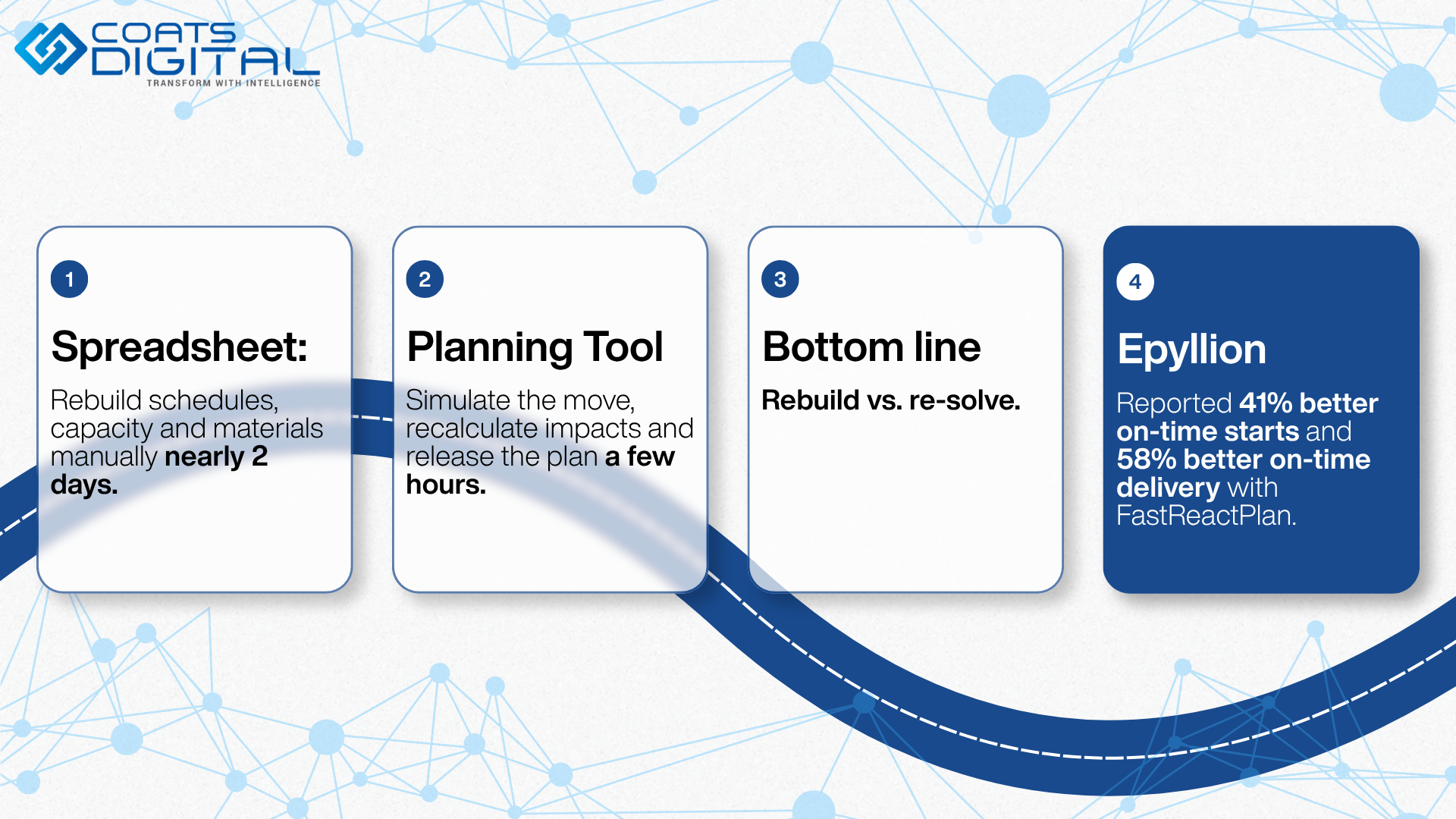
Moving an order to another factory means re-planning its critical path, its materials and its line load. A spreadsheet rebuilds all three by hand over days; planning software recalculates them in hours. The scenario below is illustrative, and its numbers and timings are examples rather than measured results.
The scenario
A 20,000-piece order of knit polo shirts is planned on a line in Vietnam, with fabric due in week 6 and shipment in week 12. Since 24 July 2026, Vietnamese apparel has carried a 12.5% Section 301 duty on top of normal duty, while apparel entering duty-free under CAFTA-DR is exempt. The brand asks whether the order can move to a partner factory in Guatemala.
Here is the part most comparisons skip. CAFTA-DR duty-free treatment generally follows a yarn-forward rule of origin, so the yarn and fabric must come from the United States or the region, and for some cotton and man-made-fibre knit fabrics the rule reaches back to the fibre. The factory move is also a materials move: a new mill, a new lead time and possibly a new lab dip.
The spreadsheet path
- Find the order across the master plan, the line-loading sheet, the T&A tracker and the fabric tracker.
- Rebuild its critical path for the new factory: new fabric booking with a qualifying mill, new lab dip, new pre-production sample and approvals.
- Check the Guatemala factory’s line load by hand and push other orders around to make room.
- Re-check fabric and trim timing against the new mill’s lead time.
- Work out what fills the line freed up in Vietnam.
- Email the revised files to merchandising, both factories and the mills, and hope no formula broke on the way.
Illustrative elapsed time: the better part of two days, with the plan effectively frozen in the meantime.
The planning tool path
- In the master-planning view, move the order to a Guatemala line as a what-if scenario, leaving the live plan untouched.
- Check the load against that line’s real capacity, including the learning curve for a new style.
- Let the critical-path dates and material requirements recalculate, and see whether the new mill’s lead time still supports week 12.
- Compare the scenario with the current plan, including its knock-on effect on other orders, and choose.
- Release the revised plan to suppliers and both factories. The capacity freed in Vietnam is immediately visible for new orders.
Illustrative elapsed time: a few hours, most of it spent deciding rather than calculating.
The difference is not effort or skill. One approach rebuilds the plan; the other re-solves it.
A real-world example: Epyllion Group
Epyllion Group, a vertically integrated knitwear manufacturer in Bangladesh, handles at least 300 style changes a month in quantities from 500 to 100,000 pieces. It used to coordinate pre-production through spreadsheets and email, and found those methods were holding back its growth.
After building a central planning team around FastReactPlan’s line planning boards, critical path tools and control-tower view, Epyllion reported a 41% increase in on-time start of production and a 58% improvement in on-time delivery performance. Its operations GM put it simply: “Without this tool, I can’t imagine how we can manage this complexity.”
When Should You Replace Spreadsheet Production Planning? Eight Signs
You have outgrown spreadsheet planning when re-planning takes hours, the plan spans more lines or factories than one person can hold in their head, on-time delivery is slipping, or the plan depends on one person’s file. As a rule of thumb, three or more of the signals below make a strong case for a planning tool.
- Re-planning takes hours or days: A fabric delay or order change triggers a manual rebuild rather than an adjustment.
- You plan across several factories or many lines: Each site has its own file, and reconciling them is a weekly chore.
- On-time delivery is slipping without a clear cause: Orders are found to be late when it is already too late to recover them.
- What-if questions take too long to answer: “Can we take another 10,000 units in October?” gets a guess rather than a tested answer.
- The plan lives in one person’s file: If that planner is away for a fortnight, planning slows or stops.
- A spreadsheet error has already reached a real decision: A broken link or wrong formula has caused a late order or the wrong fabric booking at least once.
- Materials and the plan live in separate places: Shortages surprise the factory because fabric calls follow an old version of the plan.
- Sourcing moves between countries more often than it used to: Duty changes and buyer requests move orders faster than manual re-planning can follow.
Is planning software overkill for a small factory?
Not necessarily. A single line running a stable, repeat order book may not need dedicated software yet. The tipping point is complexity and frequency of change rather than headcount: several lines or factories, high style variety, short lead times and frequent re-planning are what justify a tool.
Coats Digital designs FastReactPlan for apparel and footwear manufacturers of all sizes, so being small does not rule it out on its own. The better question is how many hours a week your team spends rebuilding the plan, and what late orders are costing you.
How To Evaluate Production Planning Software: Seven Criteria
Evaluate apparel production planning software on seven criteria: an apparel-native data model, capacity, critical path and materials in one model, re-planning speed, integration, deployment and data ownership, speed to value, and proof at your scale. Take the questions below into every vendor conversation, and ask to see a real re-plan on your own data rather than a scripted demonstration.
| Criterion | Question to ask the vendor | What a good answer looks like |
| Apparel and footwear data model | Does it represent styles, sizes, colourways, BOM levels, standard minutes and tooling natively? | Built for garments and footwear, not generic manufacturing software adapted to fit |
| One model for capacity, critical path and materials | If I move an order, do line load, milestones and material calls all update together? | One change updates all three, with no separate modules to reconcile |
| Re-planning and what-if speed | How long does it take to test and compare a scenario on a plan of our size? | Scenarios are built and compared without touching the live plan, in minutes rather than days |
| Integration | How does data move to and from our ERP, PLM and shop-floor systems? | Automatic exchange, with integrity checks by the receiving system |
| Deployment and data ownership | Where is it hosted, and who owns and can export the data? | Clear hosting options and full data export on request |
| Speed to value and adoption | How long until planners use it daily, and what does onboarding involve? | A phased rollout, with planners productive within the first phase |
| Proof at your scale | Which comparable factories use it, and what changed for them? | Named references with measured outcomes, not just logos |
How FastReactPlan answers these questions
For transparency, here is how Coats Digital’s own tool responds to several of them. FastReactPlan was developed specifically for apparel and footwear manufacturers and manages capacity, materials and the pre-production critical path in one solution. It exchanges data with ERP, PLM and shop-floor systems through an automatic shared-file interface that supports integrity checking by the receiving system.
Optional modules cover APS for large order volumes, embellishment and laundry planning, and constraint planning for lasts and moulds. Teams that want to connect fabric buying and cutting to the production plan can add FastReactFabric. Ask any vendor, us included, for named references in factories that look like yours.
How Do You Move Off Spreadsheets Without Disrupting Production?
Move off spreadsheets in stages: map the current process, start with the critical path or one factory, fix the data, run the tool in parallel for a fixed period, involve planners early, and agree measurable targets before go-live. Nobody has to switch off a working process overnight.
- Map how the plan is built today: Document where each input comes from, which files feed which, and which decisions the plan drives. This exposes the hidden logic that currently lives in one person’s head.
- Start with the highest-pain area: That is usually the pre-production critical path or a single factory, not a multi-site rollout on day one. An early, visible win builds trust faster than a broad launch.
- Fix the data before go-live: Orders, line capacities, SMVs, efficiency curves, tooling and material lead times all need to be accurate, because a planning tool is only as good as its inputs.
- Run in parallel, with an end date: Keep the spreadsheet alongside the tool and compare outputs week by week; Capterra’s guidance on moving to MRP recommends the same validation against existing plans. Set a date when the spreadsheet retires.
- Bring planners and merchandisers in early: The barrier is rarely technical. It is a planner’s fear of losing the control Excel gives, so show the tool absorbing the Monday rebuild for them.
- Agree targets and record the baseline: Decide how you will measure re-planning time, on-time start, OTDP and capacity utilisation, and capture today’s figures before anything changes.
- Extend once the first area has delivered: Roll out to further factories, lines and materials planning when the pilot has met its targets.
Timelines vary, but they need not be long. Song Hong went live at its headquarters and first two factories within four months, and covered five factories in nine.
Five mistakes that stall the switch
- Rebuilding the spreadsheet inside the new tool: Teams import every old column, workaround and exception, then wonder why nothing changed. Use the switch to simplify the process.
- Going live on optimistic standard minutes: If SMVs or efficiency assumptions are wrong, a finite-capacity plan will be precisely wrong. Audit them first.
- Treating it as an IT project: Planning software succeeds when planning and merchandising own it. IT supports integration; it cannot own the plan.
- Letting the parallel run drift: A parallel run without an end date means two plans and twice the work, and the spreadsheet usually wins by default.
- Measuring only OTDP: On-time delivery lags. On-time start of production, plan versus actual and re-planning time move first and tell you sooner whether the change is working.
What to measure before and after go-live
| Metric | Why it matters | How to measure it |
| Re-planning time | The core benefit of a model over a file | Hours from a disruption, such as a fabric delay, to a released revised plan |
| Planning cycle time | Planner time freed for decisions | Time to produce and confirm the weekly or monthly plan |
| On-time start of production | The earliest signal of delivery risk | Share of orders starting sewing on the planned date |
| On-time delivery performance (OTDP) | The buyer-facing result | Share of orders shipped by the promised date |
| Plan versus actual | Whether the plan is realistic | Planned against actual output, by line and week |
| Capacity utilisation | Hidden capacity found or lost | Loaded minutes against available minutes; machine idle time |
| Air freight spend | The cost of late recovery | Air freight as a share of total freight spend |
How Is AI Changing Production Planning?
AI is making the production plan easier to query and faster to simulate, while sourcing trade-offs and customer priorities still depend on human judgement. The factories that gain most will be those whose plan already lives in a structured model AI can work with.
Where AI helps
Planning tools are adding AI dashboards and assistants that answer plain-language questions, so the wider team can use the plan instead of relying on specialist planners alone. Fashion companies are already heading this way: in the 2026 USFIA benchmarking study, demand forecasting and inventory planning was the most-cited use of AI, reported by 56.3% of respondents.
FastReactPlan’s AI Analytics is one example, offered as an optional add-on rather than part of the core product. It includes an AI dashboard for KPIs, financials and operations, an assistant called “Ask Coats Digital” that answers typed questions with insights and charts, and customisable dashboards with automated reports.
Where judgement stays
AI is strongest where work is repetitive and the rules are known: re-cascading dates, flagging orders at risk, producing a first-pass schedule, or answering “which orders ship late if this fabric slips?” It is weakest where the decision depends on relationships and strategy, such as which customer gets priority when two orders collide, or whether to move a programme to a new country.
One caution is worth stating plainly. An AI assistant sitting on top of a spreadsheet only answers faster from stale data. AI adds most value when the plan underneath it is already a live, finite-capacity model.
The Bottom Line: Plan At The Speed Of Change
Production planning in apparel and footwear used to mean producing one good plan a season. Now it means keeping a plan accurate while orders, fabric dates and US duty rates move underneath it. Spreadsheets were built for the first job and cannot do the second, because they hold a static version of the plan rather than a live model of capacity, the critical path and materials.
That is the real improvement production planning software brings: re-planning becomes an adjustment instead of a rebuild. With US apparel duties moving through three legal regimes in 2026 and sourcing spread across more countries than a year ago, that speed has become a commercial advantage, and it is one a spreadsheet cannot provide.
Where to go next
- See how FastReactPlan plans capacity, the critical path and materials in one place.
- Read published results from manufacturers using Coats Digital solutions.
- Compare tool categories in our guide to production planning software for US clothing brands.
To see how FastReactPlan turns the Monday-morning rebuild into a fast, reliable re-plan across your factories, arrange a demo with the Coats Digital team.
Frequently Asked Questions
-
What is production planning software?
Production planning software plans and controls manufacturing against real, finite capacity. In apparel and footwear, it typically covers order and capacity planning, the pre-production critical path, demand-pull material planning and line scheduling in standard minutes, then tracks actual output against the plan. Its defining feature is that the plan is a live model: when an order, date or capacity changes, the software recalculates the knock-on effects instead of waiting for someone to rebuild a file.
-
How do production planning tools improve on spreadsheet-based planning?
They replace a static file with a model that recalculates. Planning tools load lines against finite capacity, so they will not promise output a line cannot make. They link critical-path milestones, so a late approval moves every dependent date and raises an alert. They calculate materials from the latest plan and let planners test scenarios before committing. For makers serving the US, where duty changes keep moving orders between countries, that turns days of manual re-planning into hours.
-
Is Excel good enough for production planning?
For a single factory with a small, stable, repeat order book, Excel can be adequate. It becomes a liability as styles, lines, factories and the frequency of change grow, because it has no model of finite capacity, no linked critical path and no practical way to compare scenarios. It also concentrates risk: formula errors spread unnoticed, and the logic often lives with one planner. Most teams outgrow Excel when re-planning after a disruption starts taking hours.
-
Does an ERP or PLM handle production planning?
Usually not in the way garment and footwear production needs. An ERP records orders, inventory, purchasing and finance, and a PLM manages product data and development. Both store information a plan depends on, but neither loads sewing lines against finite capacity or re-cascades a pre-production critical path when a milestone slips. That is why planners in ERP-equipped factories often still keep a planning spreadsheet. Dedicated planning software fills that gap and exchanges data with both systems.
-
What is advanced planning and scheduling (APS)?
Advanced planning and scheduling (APS) is software that plans production against finite capacity and several constraints at once, then sequences work in detail across lines and sites. It goes beyond a basic capacity check by weighing changeovers, material availability and delivery priorities together, and by comparing alternative schedules automatically. In apparel, it suits large, complex order books. FastReactPlan offers APS as an optional module for planning large volumes of orders against multiple constraints.
-
How long does it take to implement production planning software?
It depends on scope, data quality and the number of sites. Most teams start with one high-pain area, such as the critical path or a single factory, run the tool in parallel with the spreadsheet, then extend it once results are proven. As one published example, Vietnamese manufacturer Song Hong went live at its headquarters and two factories within four months and covered five factories in nine. Clean order, capacity, SMV and materials data shortens any timeline.
-
What return on investment can production planning software deliver?
Returns usually come from recovered planner time, fewer late deliveries, less air freight, lower buffer stock and better capacity utilisation. Build the business case by measuring today’s planning time, on-time delivery, air-freight spend and line utilisation, then estimating realistic improvements. Coats Digital reports that FastReactPlan customers typically see payback within 12 months, but vendor figures are indicative, so test the case against your own baseline before and after go-live.
-
How does planning software help with tariff-driven sourcing changes?
A duty change that makes another country cheaper creates a re-plan: a new factory, a new capacity check, a new critical path and often new materials. Apparel moving to Central America, for example, generally needs regional yarn and fabric to qualify for CAFTA-DR duty-free treatment, so the mill may change too. Planning software lets the move be tested as a scenario against the receiving factory’s real capacity, with dates and materials recalculated, before anyone commits.
-
Can production planning software handle footwear lasts and moulds?
Yes, if it includes constraint planning. Footwear production depends on finite, style- and size-specific tooling such as lasts, moulds and forms, and a mould can only be in one press at a time. Spreadsheets track this poorly, so tooling is easily double-booked. Constraint planning records each tool and schedules production around its availability, so the plan respects limits that line capacity alone does not show. FastReactPlan offers this as an optional last and mould planning module.
-
What is FastReactPlan?
FastReactPlan is Coats Digital’s production planning and control software for apparel and footwear manufacturers. It plans capacity at factory and line level, manages the pre-production critical path, calculates materials on a demand-pull basis using data from the ERP, and schedules lines on a visual drag-and-drop board. It tracks actual output against the plan and flags orders at risk. It complements ERP and PLM systems rather than replacing them, and optional modules add APS, constraint planning and AI analytics.
-
Does production planning software replace planners?
No. It removes the repetitive work that fills a planner’s week, such as rebuilding schedules and re-cascading dates after every change, so planners can spend their time on decisions. The software models capacity and flags risk. The planner still sets priorities, negotiates with buyers and suppliers, and decides which order yields when two collide. In practice, planning becomes a more strategic role, because the planner is finally acting on the plan instead of rebuilding it.
-
What is OTDP, and how does planning software improve it?
On-time delivery performance (OTDP) is the share of orders delivered by the promised date. Planning software improves it by keeping line loading within real capacity, protecting the pre-production critical path and aligning materials with the live plan, so problems surface while there is still time to act. Track on-time start of production alongside OTDP: it is the earlier signal, because an order that starts late rarely ships on time without overtime or air freight.
Garment Capacity Planning Software in India: How to Size, Choose and Implement It (2026)
How Production Planning Tools Improve on Spreadsheet-Based Planning in the USA

How Bangladesh Knitwear Factories Improve Operator Efficiency Across Sewing, Linking and Finishing
All Blog Categories
- Production Planning
- Corporate
- Method Time Cost Optimisation
- Supply Chain Solutions
- Sustainability
- Videos